
Unified agent memory in any MCP client
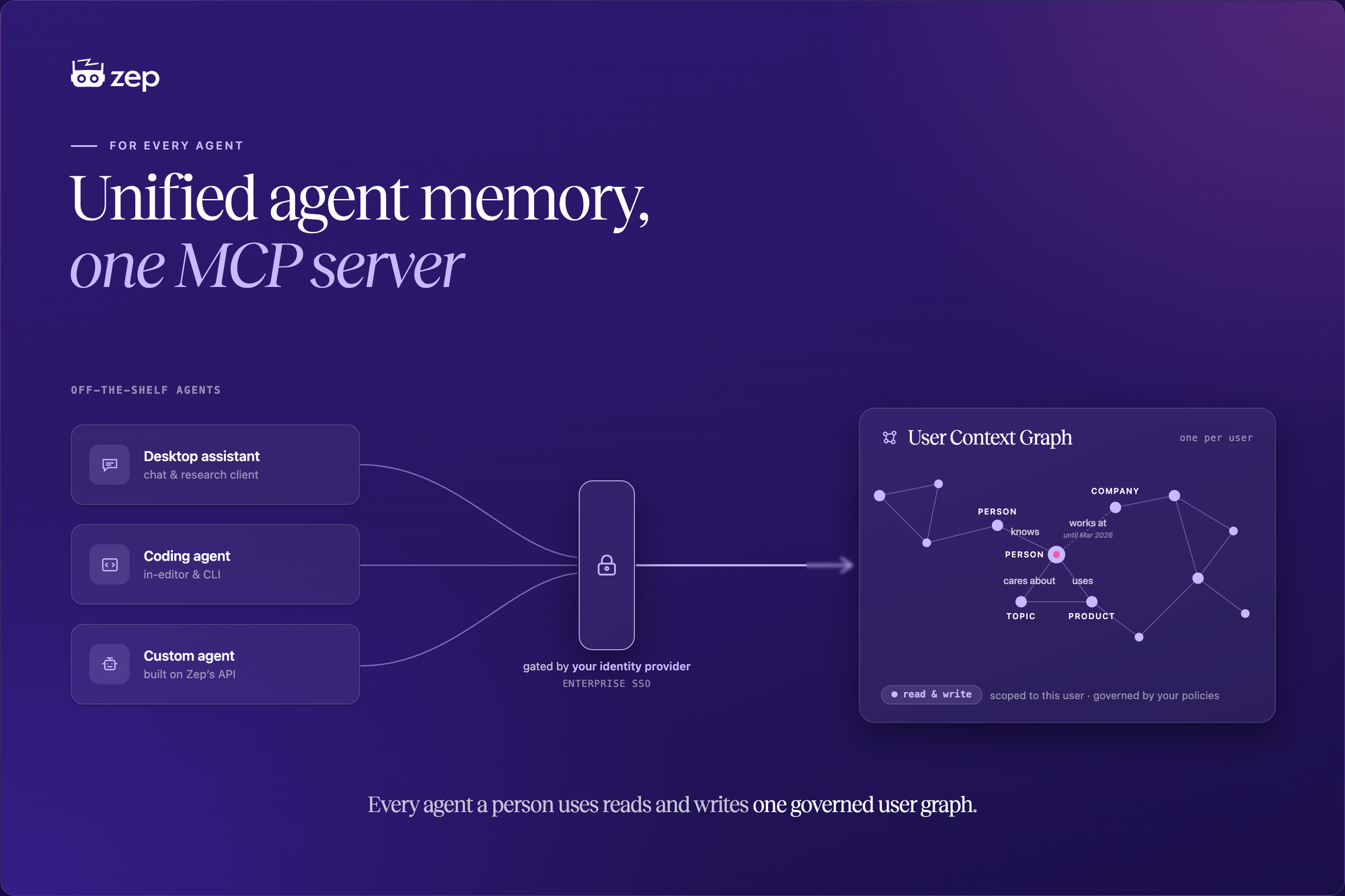
Your team's agents are split across surfaces: the desktop assistant, the coding tool, the agents you build in-house. Each keeps its own memory or none at all. The Memory MCP Server puts them on one governed user graph, gated by your enterprise single sign-on.

Key takeaways
- One graph across every surface. Desktop assistants like Claude and ChatGPT, coding agents like Cursor and Claude Code, and the custom agents you build on Zep's API all read and write the same user agent memory. Context written by one is available to the next.
- Your enterprise SSO governs access. Each user signs in through the identity provider you already run, so who reaches agent memory follows the access controls you already enforce. No per-client setup, and the same connection works across Entra ID, Okta, and Google Workspace.
- Users reach only their own context. Zep's user model scopes every connection to the authenticated person's own graph, so one user can never reach another user's memory or another project.
- Governed by Zep's access and retention policies. Memory reached through the MCP server follows the same access controls and retention rules as the rest of your project, and a connection can be left read-only.
- Stays inside your deployment boundary. The server runs where your agent memory already lives, on Zep Cloud or in your VPC, so no user data leaves your deployment and your identity provider's only job is login.
One graph per user: Any agent can writes to it and read from it.
The problem: memory stranded on each surface
A person on your team works across several agents in a day. They draft in a desktop assistant, write code in an agent inside their editor, and use the in-house agents your organization built. Each of these holds its own context, or starts cold every session. The desktop assistant does not know what the in-house agent already learned about that user, and the coding agent knows neither.
Until now, only the agents your organization built on Zep's API could reach a user's memory. The off-the-shelf agents your people already live in had no way in. The same user is modeled three times, inconsistently, and the work one agent does to understand them is lost to the others.
The requirement is narrow and hard at the same time: let any client a user trusts reach that user's memory, without loosening who can read what.
The shared user graph
The Memory MCP Server lets an end user connect an MCP client to their own Zep memory. The user signs in through your enterprise identity provider; the client then searches their memory for context and, when you allow it, adds to it.
Both kinds of agent now work against the same memory. A user's in-house agent and their personal MCP client share one user graph, so a fact the in-house agent recorded this morning is available to the desktop assistant this afternoon.
This covers the surfaces where work actually happens: desktop assistants such as Claude and ChatGPT, coding agents such as Cursor and Claude Code, and the custom agents you build on the API. One user, one graph, reachable from each.
Built for the enterprise
The same memory is now reachable from more agents, and it stays under the controls you already run: your single sign-on, your access policies, your deployment.
Sign-in goes through your identity provider, so everyone who reaches agent memory is already governed by it, with nothing to register per client. An administrator connects the provider once (see Configuring authentication); after that, any client a user trusts connects with the project's endpoint URL.
Each user reaches only their own context. One user's connection can never read another user's memory or another project, and memory served through the server follows the same access and retention policies as the rest of your project. Connections are read-only by default, and an administrator decides per connection whether a client may add memory, with an account-level kill switch to stop all writes at once.
Everything runs inside your Zep deployment, on Zep Cloud or in your VPC.
What your users can do
Each connected user reads and writes only their own user graph. The server exposes three tools.
| Tool | Access | Purpose |
|---|---|---|
search_graph |
read | Search the user's memory for context relevant to a query. Returns a ready-to-use context block by default, or raw observations, thread summaries, or episodes. |
get_user_summary |
read | Return a narrative summary of who the user is and what is stable about them. |
add_memory |
write | Add new information to the user's memory as text, JSON, or a message. |
Write access appears only when an administrator enables writes on the connection. The account-level kill switch disables all writes regardless of per-connection settings.
Connecting a client
An end user connects in three steps, with no manual configuration:
- Add the project's MCP endpoint URL to your client as a remote server. In Claude Code:
claude mcp add zep-memory --transport http <url>. - Sign in on your organization's page when the client opens it.
- Approve the consent screen that names the client and the access it requests.
The client then lists Zep's tools and works against your memory.
Administrators set the connection up once: register an OIDC application in your identity provider, create the connection on the project's Settings ▸ MCP page, map identities to users, and decide on writes and provisioning. See Configuring authentication for the admin walkthrough and Connecting a client for the end-user steps.
How to enable it
The Memory MCP Server is rolling out to all Enterprise plan customers. If you don't yet have access, contact your account manager. Support for the Flex and Flex Plus plans arrives in the next several weeks.
Next steps
- Memory MCP Server overview: what it does and who it's for.
- Configuring authentication: for administrators connecting your identity provider.
- Connecting a client: for end users bringing a client online.
FAQ
Which agents can use this? Any MCP client that supports remote servers over HTTP and OAuth, including Claude, ChatGPT, and Cursor, plus the custom agents you build on Zep's API. They all read and write the same user graph, so context written by one is available to the next.
Can one user reach another user's memory? No. The tools take no user, graph, or project argument. The authenticated identity fixes the target to that user's own graph, so a token cannot reach another user's memory or another project.
Can a connected client write to memory? Only when an administrator enables writes for the connection. Connections are read-only by default, and an account-level kill switch can block all writes.
Do I have to register each client in my identity provider? No. Zep brokers the sign-in, so your IdP only handles login. The MCP client never registers with your IdP and never receives a token from it.
Can I run it in my own cloud? Yes. It runs on Zep Cloud or in your own VPC. A VPC deployment uses a different endpoint host, which your administrator provides.