
3 Decisions That Shape Every Agent's Context Architecture
Every agent context architecture comes down to three decisions: scope, data sources, and retrieval strategy. A framework for reasoning about persistent context for AI agents.

The AI agent community talks a lot about "agent memory." But when you sit down to implement it, you realize "memory" undersells the problem. What your agent needs is context — the right information, assembled at the right time, in the right structure.
That last part matters more than people think. Raw text stuffed into a prompt is information, but it's not structured context. A context graph — where information is organized into entities, relationships, and temporally-aware facts — gives the LLM something fundamentally more useful: a structured picture of the world it can reason over, not a wall of text it has to parse.
This is context engineering: the practice of assembling the right information around an LLM so it can accomplish tasks reliably. And every context architecture comes down to three decisions.
Decision 1: What scope of context does your agent need?
| Option | What it covers | In Zep |
|---|---|---|
| User-specific | Personal context per user: preferences, interaction history, account details | Per-user context graph |
| Non-user | Shared knowledge: policies, catalogs, domain data, runbooks | Standalone graph |
| Both | Most production agents need both | Mix of both |
User-specific context is personal to each user — their preferences, interaction history, account details. In Zep, this lives in a per-user context graph: one graph per user, continuously updated from every conversation and data source, so context learned in one session is available in every other.
Non-user context is everything else: company policies, product catalogs, runbooks, compliance rules, domain knowledge, team wikis — any information that isn't tied to a specific user but that agents need to do their jobs. Zep handles this with standalone graphs — arbitrary context graphs you can create for any purpose and fill with any data. A product catalog graph. A policy graph. A graph per department, per project, or per knowledge domain. The structure is entirely up to you.
Crucially, access to any graph is fully customizable. You control which agents query which graphs at runtime. A support agent might query the user's personal graph plus a returns-policy graph. A sales agent queries the same user graph but pairs it with a pricing graph instead. The context graphs are building blocks; your application logic decides how to combine them.
Most production agents need both scopes. An agent that knows a customer's history and the company's return policy gives fundamentally better answers than one with only half the picture.
Why not use a standalone graph for everything?
You could — but users are the natural unit of personalization in most agent applications. They have names, histories, and preferences that accumulate across interactions. More importantly, cross-session continuity requires a stable identity to aggregate around. Without a first-class user object, context from separate conversations doesn't resolve into a coherent picture of a person.
Decision 2: What data sources feed your context?
| Source type | What it covers | How to ingest |
|---|---|---|
| Conversational | Chat messages between user and agent | Thread API |
| Business data | CRM records, documents, JSON, unstructured text | Graph API (graph.add()) |
| Both | Most agents: chat history alongside user or domain data | Thread API + Graph API together |
Conversational data flows naturally from your agent's chat loop — the messages back and forth between user and agent. It's the lowest-friction starting point: no additional ingestion pipelines, no external data sources to connect.
Business data exists outside conversations: CRM records, billing events, support tickets, documents, emails. Ingesting this alongside conversational data creates a much richer picture. When your agent knows that a user's last payment failed and they asked about cancellation yesterday, it connects dots that a conversation-only agent would miss entirely.
Zep accepts both through the same pipeline. Chat messages flow in via the Thread API. Business data — structured JSON, unstructured text, or message-format data — goes directly to any graph via graph.add(). Both are synthesized into the same context graph: entities are extracted, relationships are mapped, and facts carry temporal validity so the graph handles contradictions automatically. When a user's plan changes from Pro to Enterprise, the old fact is invalidated, not deleted.
Decision 3: How does context reach the LLM?
| Approach | How it works | Best when |
|---|---|---|
| Deterministic assembly | Context injected on every turn before the LLM runs | You need guaranteed context availability; conversational agents |
| Agent-controlled retrieval | LLM decides when and how to search; controls query logic and graph traversal | You want the agent to control how the graph is searched |
This decision affects your agent loop most directly.
Deterministic context assembly means assembling and injecting a context block into the prompt on every turn, before the LLM runs. Context is simply present — no tool calls, no chance of the model failing to search. In Zep, a single call to get_user_context() returns a structured, token-efficient block (98% token reduction versus full history) ready to drop into the system prompt.
Agent-controlled retrieval means exposing context search as a tool call. The primary advantage is control: the agent decides how to query — choosing search terms, adjusting retrieval parameters, traversing the graph across multiple calls. Two real tradeoffs follow. First, unknown unknowns: if a user's plan changed yesterday and the agent doesn't think to check, that context never surfaces. Second, tool scaling: research shows model accuracy across all tool use degrades as the available tool count grows — adding context search as a tool slightly degrades everything else the agent does. For most conversational agents, deterministic assembly is the safer architectural default.
How these decisions combine in practice
These three decisions map to a small number of patterns we see teams using in production.
Pattern 1: Per-user conversational context
User-specific scope · Conversational data · Deterministic assembly
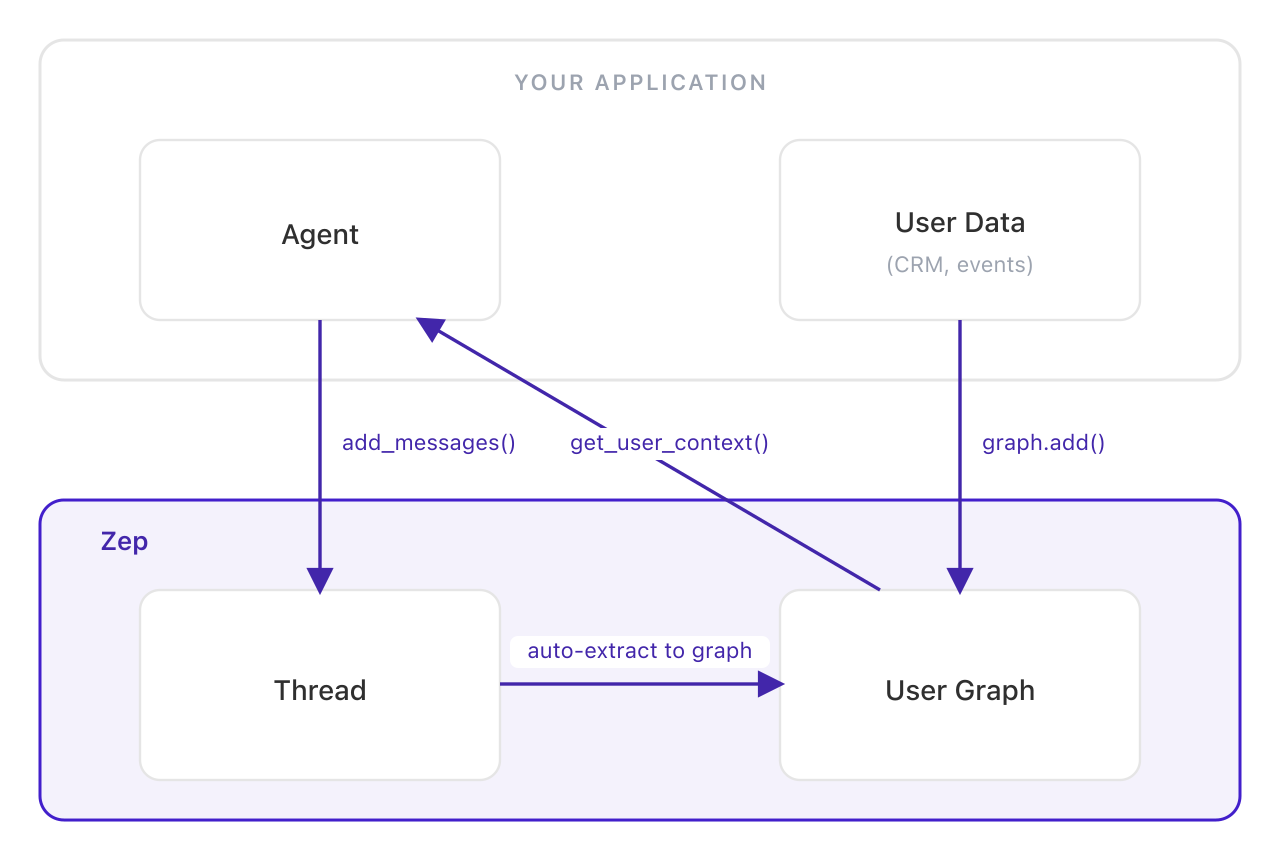
The simplest complete implementation: chat messages persist into a per-user context graph, and Zep assembles a structured context block on every turn. This is the pattern in Zep's Quick Start Guide.
Pattern 2: Domain knowledge via standalone graphs
Non-user scope · Business data · Agent-controlled retrieval
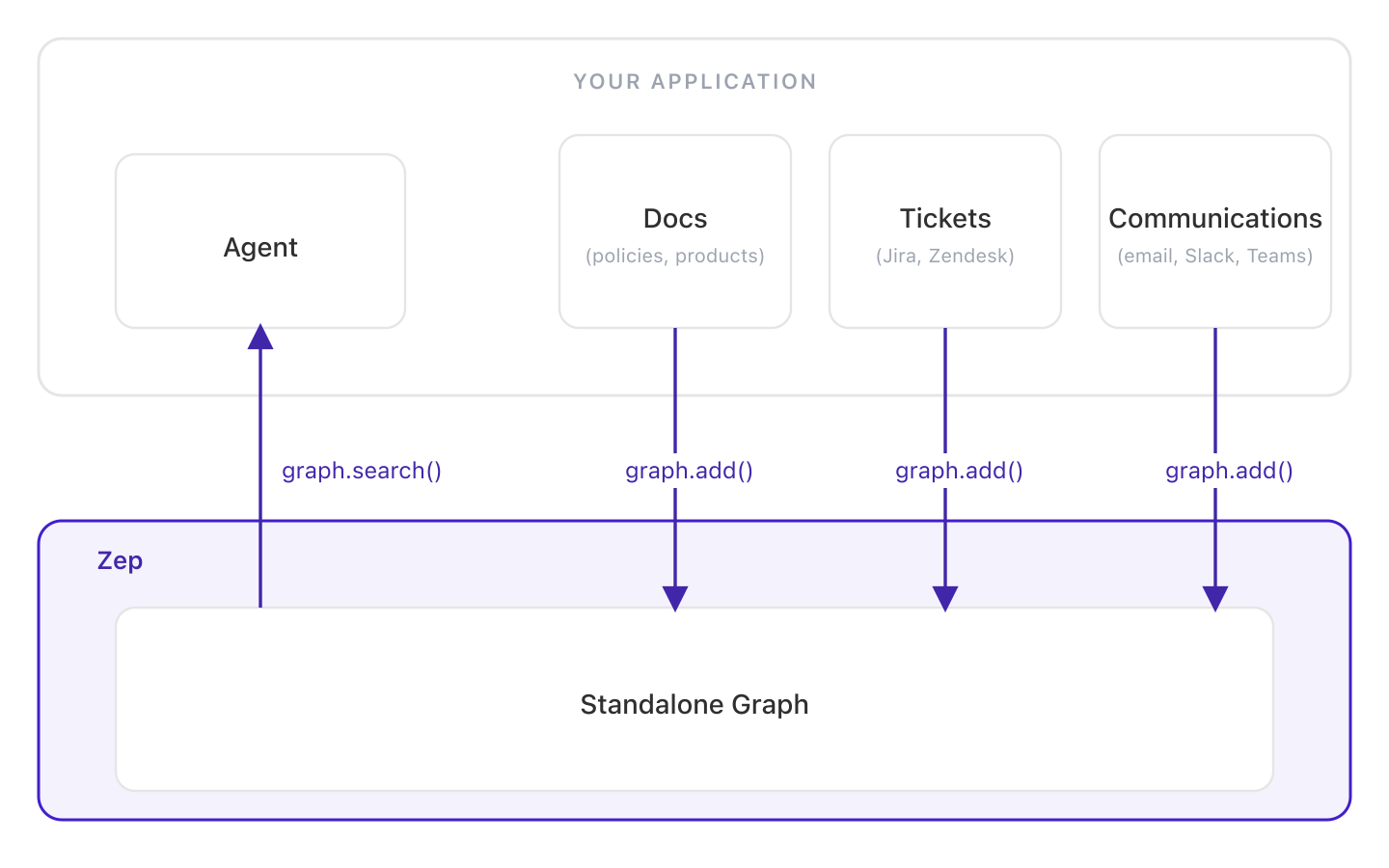
For agents grounded in shared knowledge rather than personal context. Documents, records, and business data are ingested into standalone graphs and queried via graph.search(). Unlike static RAG, the graph updates incrementally as data changes. See the domain knowledge cookbook.
Pattern 3: Agent-controlled context retrieval
User-specific scope · Mixed data · Agent-controlled retrieval
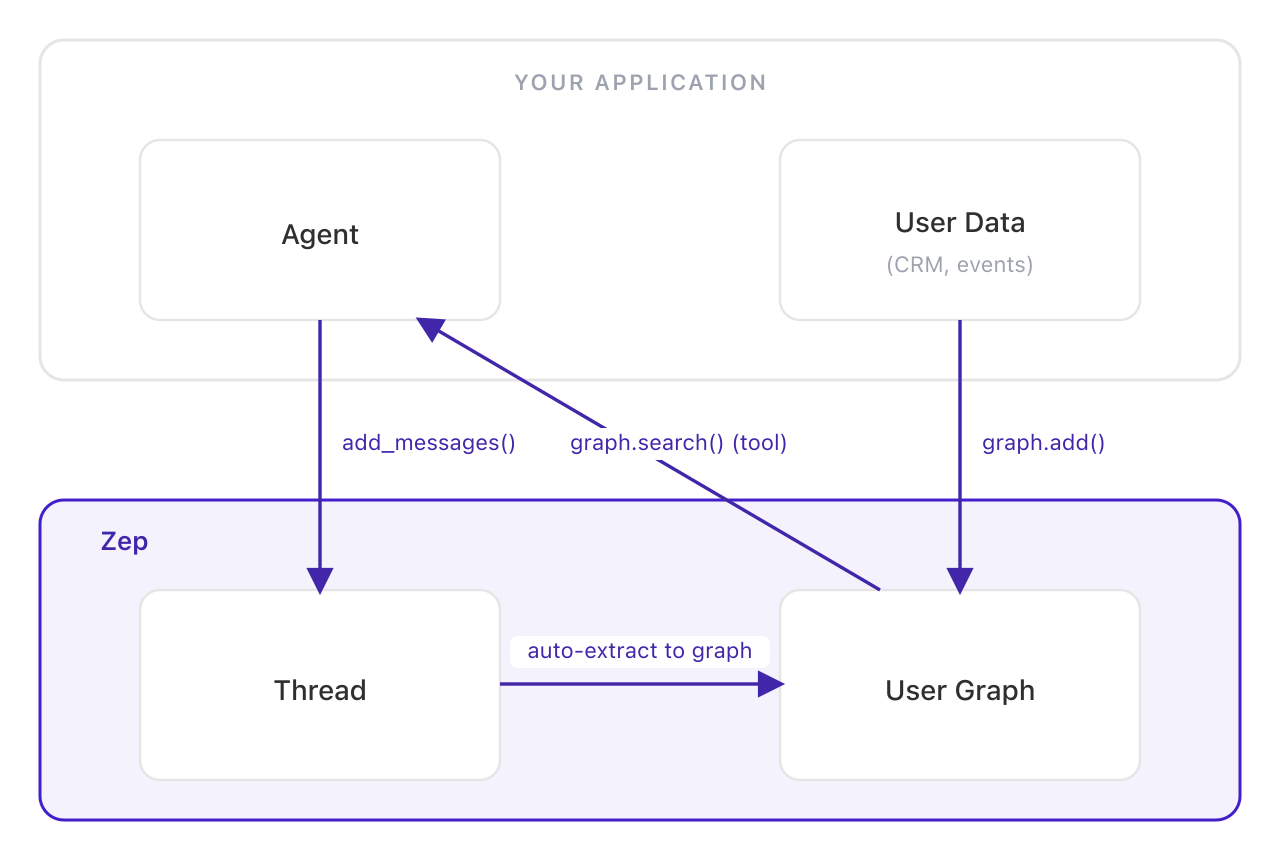
Same ingestion as Pattern 1, but context search is exposed as a tool call instead of injected deterministically. The agent controls how the graph is searched — choosing queries, adjusting retrieval parameters, traversing the graph across multiple calls. See the graph search docs.
Pattern 4: Layered context — user + domain graphs
Both scopes · Mixed data · Mixed retrieval
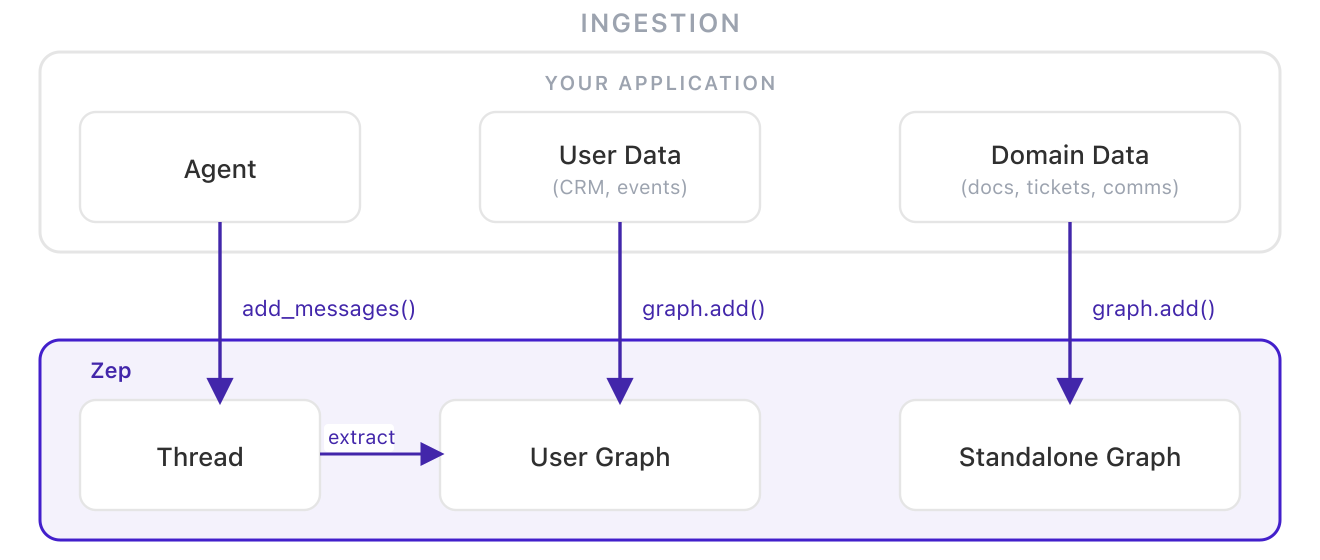
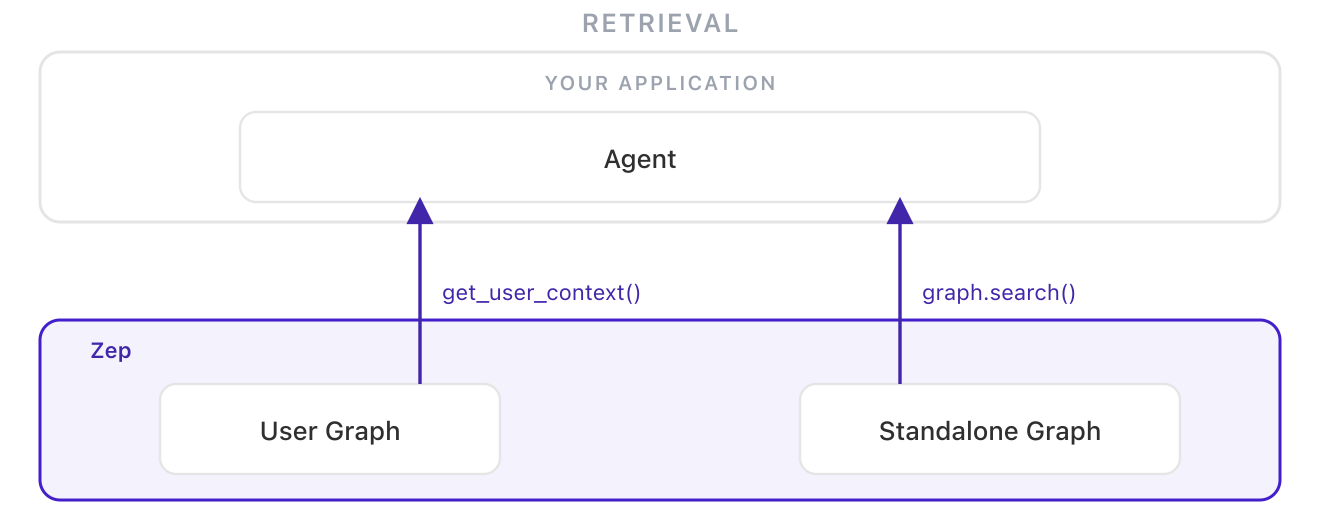
The full picture. Personal context lives in per-user graphs. Domain knowledge lives in standalone graphs. At retrieval time, the agent queries both and combines the results. Personal context stays isolated per-user; shared context stays in one place; the agent sees both. See Zep's guide on sharing context across users.
These patterns are composable. The natural direction runs from Pattern 1 toward Pattern 4 — not as a progression to rush through, but as a map of what your agent genuinely needs as complexity grows. Context architecture that starts simple and evolves intentionally tends to hold up better than architecture that tries to solve everything upfront.
What matters most is treating these as explicit decisions rather than defaults. Context architecture shapes what your agent can know — and therefore what it can actually do. Teams that leave it implicit tend to discover the gaps at the worst possible moment. The full patterns guide goes deeper on each pattern, or start building with Pattern 1.