
Zep's 5 Context Types: How to Use and Combine Each One
Zep produces five distinct types of context from a user's graph. Each captures something different. Here's when to reach for each, and how to combine them in one prompt.

Key Takeaways
- Zep produces five context types from a user's graph, each capturing what the others can't: facts, entities, episodes, thread summaries, and a user summary.
- Facts are precise, time-stamped claims on graph edges; entity summaries are the running narrative of a person, account, or concept. Use facts for citation, entities for continuity.
- Episodes are the raw source artifacts stored verbatim, and thread summaries capture the arc of a single conversation: what the user needed, what was tried, what was resolved.
- The user summary is a derived, always-present baseline of who the user is. It answers “who am I talking to” from turn one, even on a cold-start “Hi”.
- Combine them in one prompt with a context template (variables like %{user_summary}, %{edges}, %{entities}), or assemble them yourself with graph.search for full control.
Zep is the Context Lake for AI agents: the platform that manages, governs, and serves agent memory at scale. From a user's conversations and business data, Zep builds a temporal Context Graph and uses it to assemble a token-efficient Context Block that's injected into the agent's prompt on every turn. The goal is straightforward: give the agent a complete picture of the user and their domain so it can solve their problem as quickly and reliably as possible.
Reaching that picture takes more than one kind of context. For example, a fact can tell the agent what changed and when, but on its own it can't supply the surrounding narrative or explain how that change fits the user's broader situation. To cover the full picture, Zep produces five distinct types of context: facts, entities, episodes, thread summaries, and the user summary. Each captures something the others don't. Used together, they give the agent both the granularity it needs to be correct and the coherence it needs to act.
The rest of this post walks through each type, what it captures, and how to combine them in your prompt.
Facts
Facts are precise, time-stamped relationships between two entities. Each one lives on a graph edge and carries four timestamps: valid_at and invalid_at mark when the fact started and stopped being true in the real world, while created_at and expired_at mark when Zep learned about each of those events. The split matters in practice. If a user got married in March and Zep didn't process the relevant data until April, the fact's valid_at is March and its created_at is April. An agent asking whether the user was married in March still gets the right answer. Reach for facts when an agent needs an exact, citable claim along with the dates it was true.
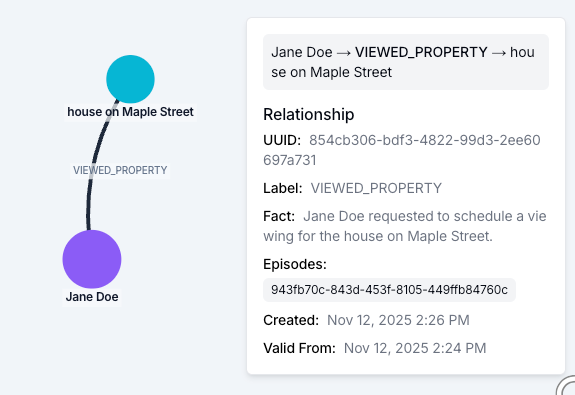
A typical fact in a Zep Context Block looks like:
Jane Doe requested a viewing for the house on Maple Street. (2025-11-12 14:24:00+00:00 - present)
You can search for facts directly:
results = client.graph.search(
    user_id="jane-doe",
    query="house offer pricing",
    limit=5,
)

for edge in results.edges or []:
    print(edge.name, edge.fact, edge.score)
When new information contradicts an existing fact, Zep invalidates the old one rather than overwriting it. Both versions stay in the graph with their validity windows intact, so an agent can still answer questions about what was true last quarter.
Entities
Entities are the nouns Zep extracts from ingested data: people, accounts, products, places, concepts. Each entity has a name and a narrative summary that Zep regenerates as new facts arrive. Where a fact is a discrete claim, an entity summary is the aggregated story of everything the graph knows about that node. Reach for entities when the agent needs a coherent, contextualized history of a specific person, place, or thing rather than isolated facts about it.
The two types complement each other inside a Context Block. Facts give an agent the precise dated claims it needs to be correct. Entity summaries give it the contextualized history it needs to be coherent. Using both gives the agent breadth and depth at once: the specifics for citation, the narrative for continuity.
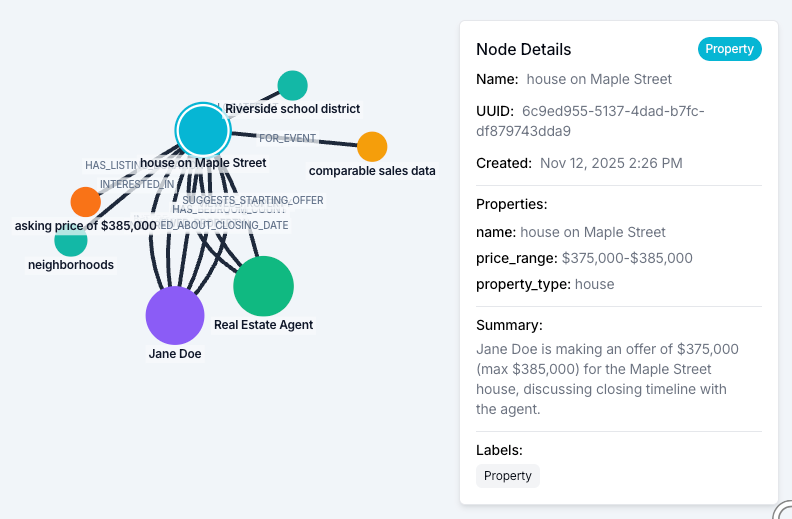
To pull entities most relevant to a query:
results = client.graph.search(
    user_id="jane-doe",
    query="properties of interest",
    scope="nodes",
    limit=5,
)

for entity in results.nodes or []:
    print(entity.name, entity.summary)
Episodes
Episodes are the raw artifacts a developer hands to Zep: chat messages, freeform text, JSON records, stored verbatim alongside the entities and facts derived from them. Episodes are the source-of-truth layer beneath everything else in the graph.
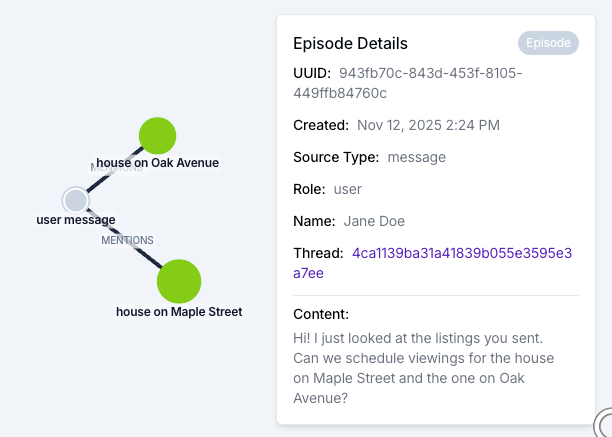
Reach for episodes when the agent needs grounded context with the original wording. Examples include quoting the source behind a fact, citing a customer's exact phrasing, or recovering the surrounding context that did not become a fact in its own right.
To pull the episodes most relevant to a query:
results = client.graph.search(
    user_id="jane-doe",
    query="messages about scheduling viewings",
    scope="episodes",
    limit=5,
)

for ep in results.episodes or []:
    print(ep.created_at, ep.content)
Thread summaries (experimental)
Experimental: the API may change in future releases. Additionally, we are still rolling this out, it is not live for everyone yet.
Thread summaries are natural-language summaries of a single thread's messages, generated and updated incrementally. Unlike facts and entity summaries, which describe the user across all their threads, a thread summary is scoped to one specific conversation.
What a thread summary captures that the other types miss is the overall arc of the conversation: what the user needed, what was tried, and what got resolved. A single conversation often touches many entities and produces many granular facts, but there's still a coherent pattern at the conversation level (a problem the user came in with, a path through it, an outcome) that doesn't live on any single fact or entity. Thread summaries surface that pattern so the agent can reference the conversation as a whole rather than only its parts.
They're also useful when the agent needs context grounded in the recent conversation rather than the entire user history.
To pull the thread summaries most relevant to a query:
results = client.graph.search(
    user_id="jane-doe",
    query="house buying progress",
    scope="thread_summaries",
    limit=5,
)

for ts in results.thread_summaries or []:
    print(ts.name, ts.summary)
The user summary
The user summary is a single, derived narrative of who a user is, generated from their entire graph and attached to the user's central entity node. Reach for the user summary when the agent needs a stable baseline of the user that doesn't depend on what was said in the most recent message.
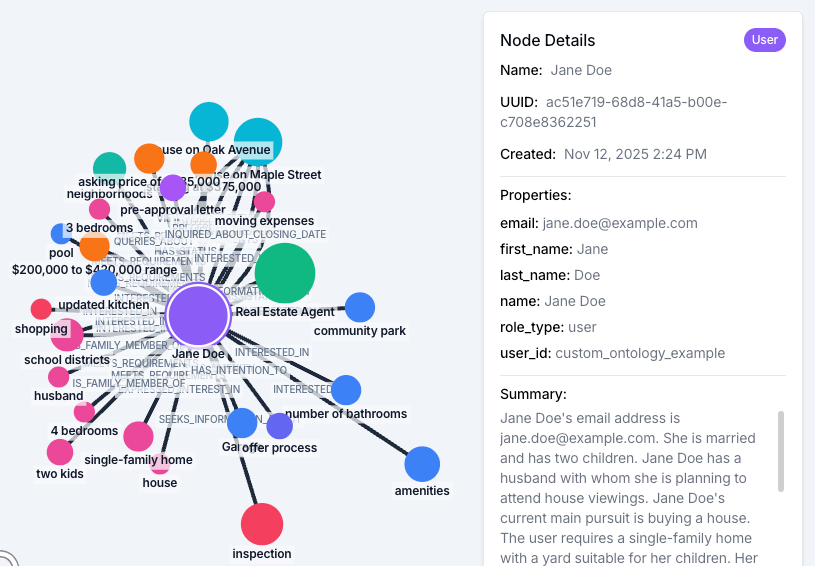
Unlike the four search-driven types, the user summary appears unconditionally in the assembled Context Block: it isn't filtered by the incoming query. That makes it the agent's persistent answer to "who am I talking to," while the search-driven sections cover "what is relevant right now." Zep regenerates the summary as the graph evolves, so it reflects what is currently known about the user (their preferences, their account state, the work they are doing) and not whatever happens to be in the last two messages.
It also solves the cold-start problem. At the very beginning of a thread, when the first user message is something like "Hi" or "I need help," the search-driven sections have almost nothing to work with. The user summary is there anyway, and it gives the agent a baseline picture from turn one.
You can shape what the summary captures by providing user summary instructions: focus it on account status and recent issues for a support agent, or on health history for a medical assistant.
How to combine these in a single prompt
The default thread.get_user_context() Context Block includes the user summary, plus the facts, entity summaries, episodes, and thread summaries most relevant to the user's recent messages. For most agents that default is enough to ship. There are two reasons to take more control: you want a particular structure or wording in the block, or you want to run different queries against different scopes and assemble the results yourself.
Use a context template when you want to customize what's in the block declaratively, without writing custom graph search code. You define one or more templates with variables (%{user_summary}, %{edges}, %{entities}, %{episodes}, %{thread_summaries}) plus any boilerplate or section headers around them, and Zep fills the variables with the most relevant content automatically. You can keep multiple templates around (for example, a support template that wants account status first and then recent issues, or a sales template that wants company entities followed by deal-related facts) and pick the right one per call.
Build a custom block via advanced context block construction when you need full control over queries, filters, and formatting. You run graph.search calls yourself, possibly with different queries against different scopes, then concatenate the results into a string. This is the right path when the defaults don't supply the query strategy you need: surfacing facts with cross-encoder reranking on a different query than the most recent message, or combining a per-user search with a standalone-graph search for shared domain knowledge.
An example: a Context Block for a real-estate buyer assistant
Here's a context template that pulls all five types into a single block for an agent helping a user shop for a house. Each section header is plain prose around a variable, so the LLM sees a labeled, structured block rather than five concatenated strings:
client.context.create_context_template(
    template_id="real-estate-buyer",
    template="""# USER
%{user_summary}

# RELEVANT CONVERSATIONS
%{thread_summaries limit=2}

# RELEVANT ENTITIES
%{entities limit=5}

# RELEVANT FACTS
%{edges limit=15}

# SOURCE QUOTES
%{episodes limit=5}""",
)
Once the template is registered, every call passes its ID and Zep fills the variables based on the most recent thread messages:
user_context = client.thread.get_user_context(
    thread_id=thread_id,
    template_id="real-estate-buyer",
)
print(user_context.context)
From there, the template can be adjusted to fit the use case: tighten or loosen the limits, scope %{edges} or %{entities} to specific types, or expand the prose around each variable to give the LLM additional prompting cues.
Read the context types overview for full SDK details on each type, or the quickstart guide to start building with Zep.